We have an admin page for the homelab and nobody at home ever opens it. This is about the other one: the page that
lives on a tablet in the kitchen and on both phones’ home screens, for two people, one of whom is learning Swedish.
It is not a dashboard. It answers “what do I need to know right now?” and then gets out of the way. I’ll call it
home.example.net.
The shape of it
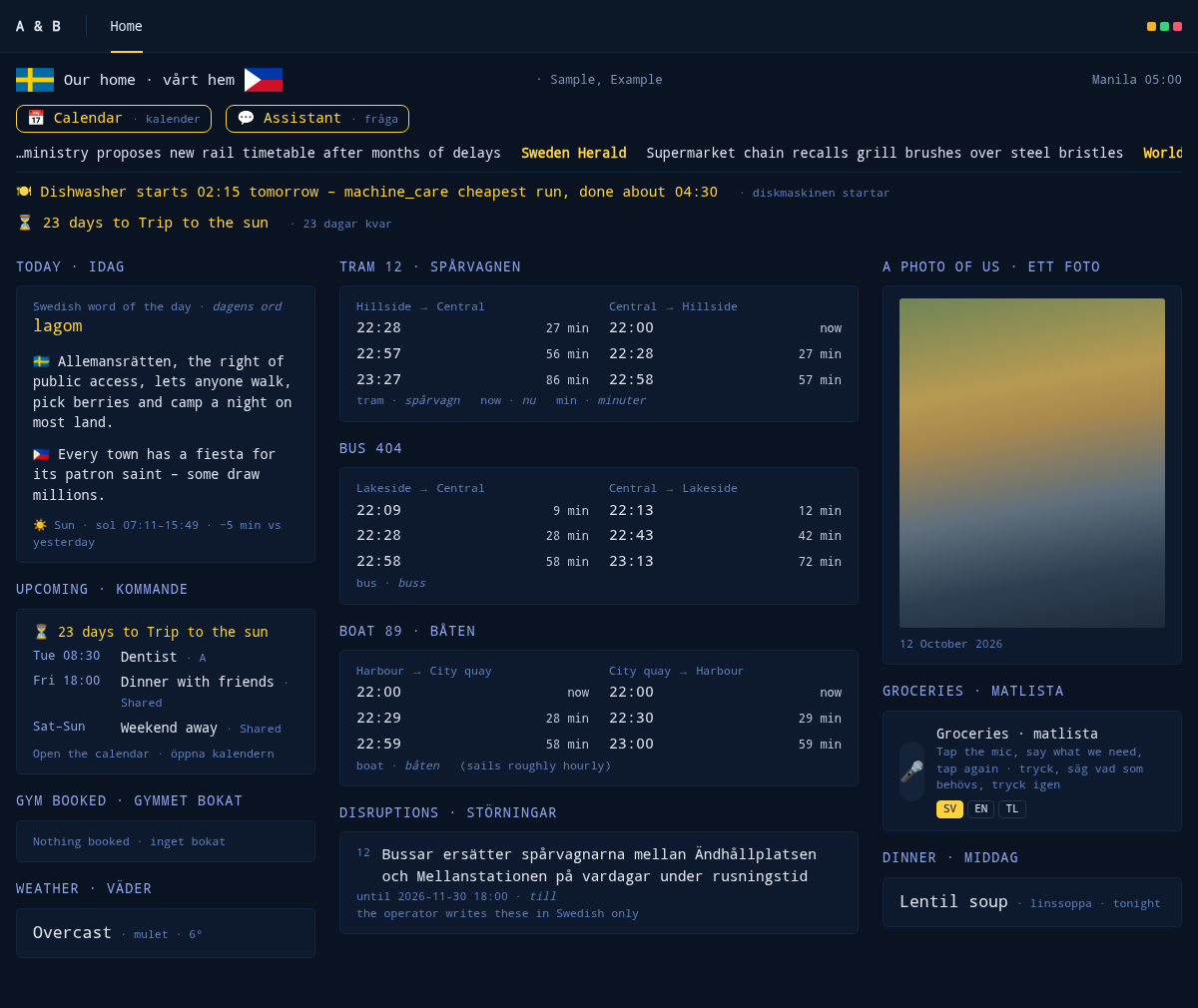
Glance renders the page; it is a single YAML file. Everything Glance cannot do on its own comes from a small Python service next to it, which I’ll call calfeed. It talks to Home Assistant, the transit API, the price API, a few RSS feeds and a couple of websites, and it serves tiny JSON endpoints and the odd iframe for Glance’s widgets to read. One Docker container each, plus a recipe manager and a photo library, all in a single Debian container on our Proxmox server. Home Assistant runs elsewhere and is reached over its API, and the local language model runs in a virtual machine of its own with an old graphics card passed through to it.
Glance Home-Assistant Proxmox Mealie Immich Ntfy Ollama
Every label is in English with the Swedish word in small grey text beside it (now · nu,
washer · tvättmaskin). Phones have no hover, so the hint is always visible rather than a tooltip. It costs some
width and nobody has complained.
The tablet turned out to be a different device from the phones. It opens the page once with ?autorefresh=10 and
remembers that in localStorage. From then on it reloads every ten minutes, but only while the page is visible
and nobody has touched it for a minute, and only after a HEAD / succeeds, so a Wi-Fi hiccup leaves the old page
up instead of an error. The same flag swaps in a fullscreen web-app manifest, which turns “Add to Home screen” into
a kiosk without browser chrome. Between 23:00 and 06:00 a black overlay at 60 % dims everything. Alerts stay
readable through it.
What needs attention
Above the columns there is a full-width strip that shows one yellow line per thing that needs attention, and nothing at all when nothing does. Most of the day it is empty, which is the point.
It is a Glance custom-api widget reading /alerts.json, and the sidecar orders the lines by how much they
matter. Official weather warnings come first, yellow and up, and only when the warning’s polygon covers us. Then the
kitchen: a fridge or freezer door open for two minutes, the hob or the oven on. Then “Washer done at 10:07, empty it
and hang up the laundry”, which stays for two hours after the cycle. That line took a while to get right. The
machine’s state stays running until someone opens the door, and Home Assistant’s last_changed resets on every
integration reload, so the sidecar watches for the transition itself. Further down the order are appliances that
are planned or running, today’s gym booking and calendar events that haven’t ended. Rain in the next twelve hours
is there with its millimetres (“umbrella” from 1 mm), and last comes what’s on TV tonight from a short watch list.
A news ticker sits above the strip with six headlines from Swedish, Philippine, Thai and world outlets, cached for ten minutes. Public emergency alerts go first, in red. On the tablet a new one also plays a tone, and that is the only sound the page ever makes.
Below all that, the tram, bus and boat tiles show exactly three departures per direction. The realtime API only knows about the next hour, so late in the evening a column would go empty. The sidecar tops it up from the journey planner, stepping forward until the line runs again, and dims those rows as “timetable”. Disruptions on our lines get a tile of their own, and the ones we have read can be hidden.
Electricity, and the planner
Prices come from the public spot-price API: 96 quarter-hour prices per day, with tomorrow’s published around 13:00. The tile shows the price now and today’s bars with the current quarter outlined. Once tomorrow is in, there is a second tab to swipe to. The colours are relative to the day (the cheapest, middle and dearest third of today’s prices), because a fixed limit is either always red in winter or always green in summer. A day where everything is under 30 öre gets a green “very cheap all day, run anything” banner instead.
The part people actually use is the appliance planner. You load the dishwasher or the washer, choose the programme, and press the machine’s remote-control button last. Within a minute the sidecar sees the button through Home Assistant, reads the programme’s run length from the machine, and works out the start whose whole run has the lowest average price. Then it waits, and presses start over the API when the moment comes.
Most of its rules were learned the hard way. The run has to end within 24 hours of the button press, because the machines switch themselves off about 24 hours after it; a plan for 20:00 the next evening once evaporated together with the machine. The washer may never finish between 23:00 and 07:00 (10:00 at weekends), so nobody hangs laundry at midnight. The dishwasher opens and dries itself and has no such rule. A pending plan is checked again every minute and moves if newly published prices offer a cheaper slot, with a silent push to say so. The page shows the three cheapest options at least two hours apart, and a tap on one pins it. If the machine doesn’t report running within three minutes of the start command, a loud push says “press start on the machine”. Opening the door after the button cancels remote control, and the plan with it.
For a long time the planner only knew about runs it had started itself. Start the dishwasher by hand and the page said nothing, which is not much help when you’re standing in the hall wondering whether it’s on. A run that starts without a plan now gets the same “running since 19:47, done about 22:39” line, with the end time read from the machine. When the integration has reloaded in between, the start time is when the page first noticed, so it can be late by a while. The end time is right, and that is the one anyone asks about.
The night the clocks went back, the planner moved the dishwasher’s 02:00 start every minute for nine minutes, and then started it fine. Timezone-aware datetimes in the repeated hour compare by wall time, so the stored start never equalled any candidate. All of the planner’s arithmetic is in epoch seconds now. The spring change will be the real test.
Under the price tile, an “energy today” tile prices each appliance’s consumption at the quarter it happened. The sidecar samples the cumulative kWh counters every fifteen minutes and multiplies each delta by that quarter’s price. The TV never fills its counter but reports small deltas, so it gets polled every minute instead.
The rest of the day
The building’s shared gym is booked through a web form from the 2000s with no API. A tiny sidecar logs in, walks the calendar and books a specific free slot; “book for two” is two bookings in the same hour. The page shows free hours for the coming days and a button. It took one test booking and one cancellation to learn that the site’s own “book” button fails when a script presses it, while picking a named place works.
One tile has tonight’s dinner from Mealie, the recipe manager we plan our meals in, and another a random photo from Immich, which holds the family photos. Both run on the same box as the page, and both will get more in-depth posts of their own: Mealie for how recipes from links and photos end up in it, Immich for the albums that sort themselves. Next to the shopping list sits a small voice recorder that turns “we need milk and two tomatoes” into list items, entirely on the local machine. The Today tile carries the date and the name day, a Swedish word of the day and a fact about each of our two countries.
Between 07:00 and 08:00 on weekdays (09:00 at weekends) one notification arrives with everything the attention line would show, plus today’s price range and, when waiting is worth it, “best hour for the washer: 23:00 (44 öre)”. It replaced three separate pushes that used to arrive within the same ten minutes. It ends with tomorrow’s calendar, one line per event. That used to be the first event and “+2 more”, which is exactly the kind of line you have to open the app to understand.
Then it turned into an app
A week after I thought the page was finished we wanted a shared calendar, and the reminders we had were a JSON file I edited by hand. So there is now a small CalDAV server (Radicale) with a calendar each and a shared one, and the sidecar got a calendar page: a month grid, a form, repeats, events over several days. Each phone is told once whose it is, and new events land in that person’s calendar unless you pick the shared one. The date fields have their own picker. Chrome on Android opens the system’s, which follows the phone’s language rather than the page and started our weeks on a Sunday.
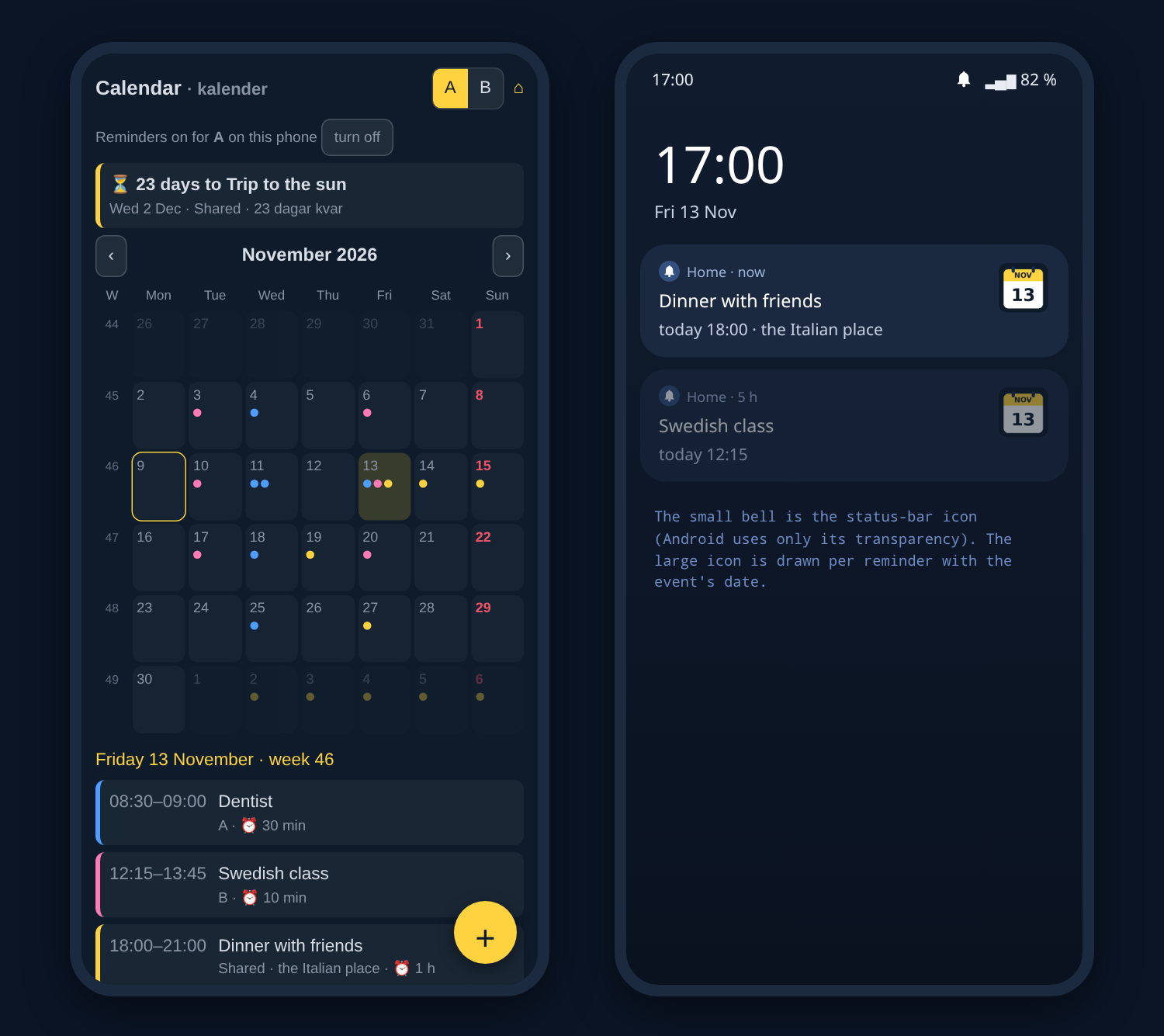
Reminders arrive as Web Push from the page’s own service worker. At the time the rest of the household alerts went through a public notification service, and I didn’t want dentist appointments readable on someone else’s server; a Web Push payload is encrypted for the one browser it is meant for. A reminder can carry a note, too: a line in the event’s description that starts with a pin is shown under it in the reminder and in the morning push the day before, which is how the recycling truck’s visit now comes with a list of what it takes. Getting it onto two phones took three tries. The first test reached my phone and not the other one. A few minutes later the push service answered “410 Gone” for that phone, and the server dropped the subscription, as it should. The browser still had its own copy, so the page went on saying “Reminders on” and never registered again. Now the page asks the server every time it opens. The next attempt registered and unregistered two seconds apart: after a successful tap, the “turn off” button appeared exactly where “Enable” had been, and a double tap pressed both. It asks first now. And the notification’s small status-bar icon came out as a white square, because Android uses only the transparency of that image and ours was a solid tile. It is a bell now, and the large icon is a little calendar page showing the event’s date.
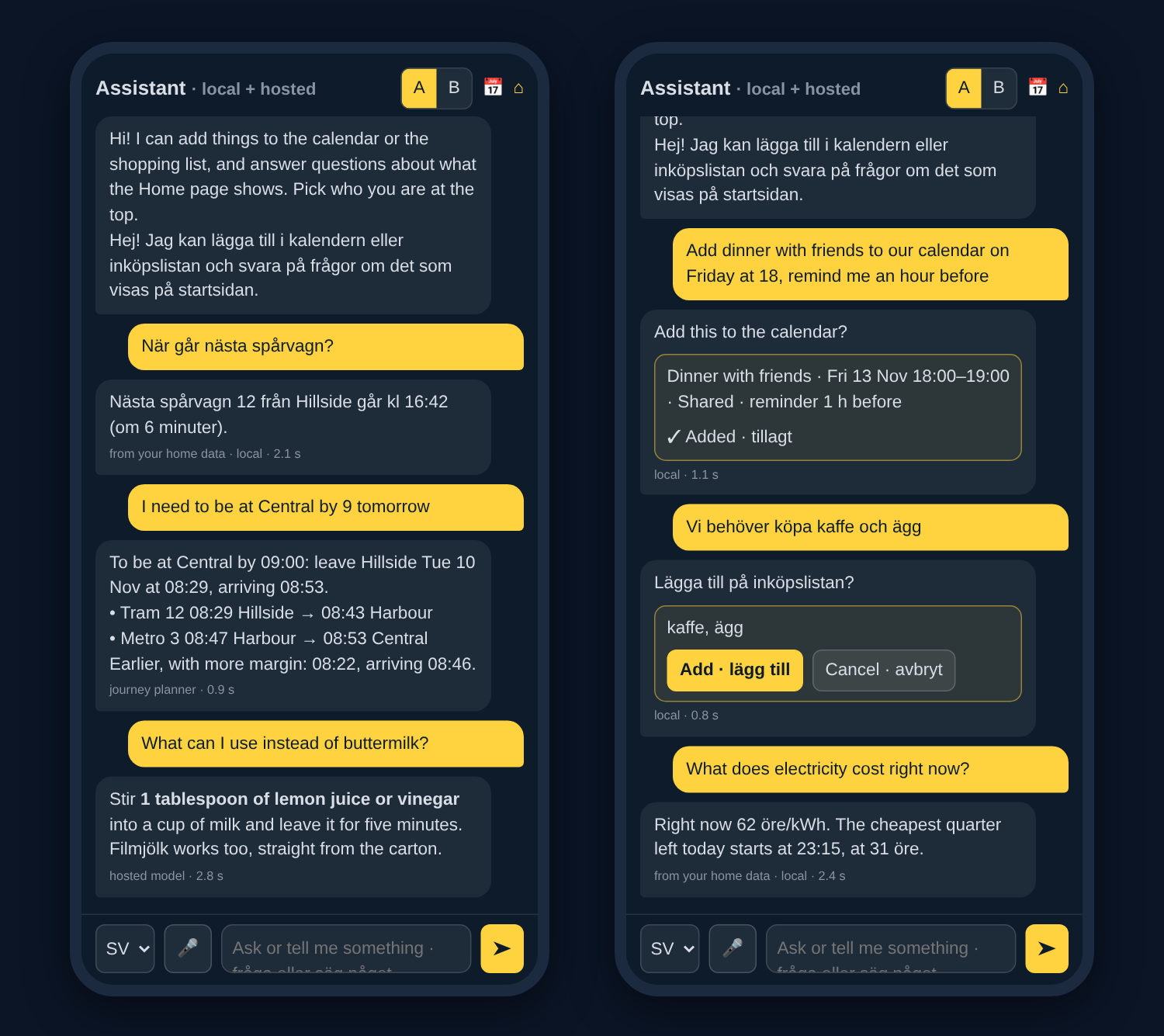
The last addition is an assistant: a chat page with a microphone. Most of it is deliberately not a language model. Adding to the calendar or the shopping list needs a verb like “add” or “buy”, and produces a card that writes nothing until someone taps it. Questions about the house (“when is the next tram”, “what does electricity cost now”) are answered by a small local model, a 7B one, from the same data the page shows. I had let that model work out dates at first, and “on Thursday” became a Monday, so dates, times and repeats are parsed in plain code now and the model only picks out the title. It also translated the titles until it was told to quote them. Then I asked which tram I needed to be at a metro station in town by four. It gave me the next tram, hours too early, and a guess for the metro. Trip questions now go to the regional journey planner, asking for arrival by a time, and the reply is assembled in code. General questions, the kind you would otherwise type into a search box, go out to a hosted model’s API (the smallest one; a question costs a fraction of a cent) with today’s calendar and the shopping list as context and nothing else from the house.
Where to eat
The newest page is a restaurant list. It started as a question about whether the page could tell us which of the places we had heard about were near us right now. A script collects places from two local food guides, a handful of food accounts we follow, and any link one of us sends it. A small model reads each post or guide entry and pulls out the name, the street, the kind of food and a line about why it was recommended, and OpenStreetMap’s geocoder turns the street into coordinates, one request a second as its rules ask. It’s a couple of thousand places now.
The Nearby button asks the phone for its position and works out the distances in the browser. The position never leaves the phone, which also meant there was nothing to build on the server for it. There is a map, filters for the kinds of food we actually eat, and three marks per place: want to go, been, and a thumb. A Book button asks for a day, a time and whose calendar, and puts the visit there, next to the reminders. The startpage shows one place we marked as want-to-go and one that just opened, and the assistant answers “somewhere Thai near here?” from the same list.
Our own notification server
The calendar was the first private thing in our notifications, and it didn’t stay the only one. Once both phones ran an always-on VPN, there was no reason to send household messages through a public service where anyone who knows a channel name can read along, so both channels moved to our own ntfy server. It only answers on the LAN and the VPN, and it wants a login to read.
That made the VPN matter more, so the page’s server now checks every few minutes that both phones are connected. A phone that dropped its VPN on our own Wi-Fi gets a push telling it how to switch it back on. Away from home there is no way to reach it, so after a full day offline it gets one SMS from our LTE modem, and never more than one a week, because those cost money. One of the phones has a battery saver that keeps switching the VPN off, and I haven’t found the setting that makes it stop for good.
What keeps it running
The sidecar warms its caches at startup, because the first cold load of ten feeds made Glance give up. Every integration that can stall has a watchdog. The appliance cloud integration silently froze for twelve hours once; Home Assistant now reloads it when the fridge hasn’t reported for 75 minutes, and says so quietly.
Nothing on the page is reachable from the internet. It lives behind the house’s reverse proxy for the LAN and the VPN, and the phones use the VPN. One phone’s VPN profile can reach that proxy and the DNS server and nothing else, and the admin pages behind the same proxy refuse its address.
If I started over I would build the attention line and the three departures first, since those two earned the page its place on the tablet. The planner can wait until the price tile has been looked at for a week, because by then you know which hours matter. And I would keep the page boring at night.
A lot of this is only sketched here. The assistant will get a longer post of its own, mostly about how little of it is a language model, and so will the SMS path for when the house is offline. In December the app also has an advent calendar, one film behind each door, which gets its own post next week.
Tools: Glance, Home Assistant, Python 3 (stdlib plus Pillow for the icons), Mealie, Immich, Radicale, Web Push (pywebpush), Ollama and Whisper for the local model and the microphone, Leaflet and OpenStreetMap for the map, Open-Meteo, the national weather and emergency alert feeds, the regional transit API and journey planner, elprisetjustnu.se’s price API, a self-hosted ntfy. The sidecar is specific to this household and not published; ask in the comments if you want more detail on a piece.
Comments
Comments are the replies to this post on Mastodon and Bluesky. Reply there and it shows up here.